March 5, 2012

Case Study: Macro Scheduler Bridges Technologies for NHS Hospital

Filed under: Success Stories — Marcus Tettmar @ 4:36 pm

Update 10th May 2012: The final, branded, PDF version of this case study can be seen here.

Really pleased to share with you the following Macro Scheduler case study which was signed off last week. We’re currently polishing it up for publication on the website but in the mean time here it is:

Macro Scheduler Bridges Technologies for NHS Hospital

“We’re part of an NHS Trust and have a responsibility to be conscientious with our resources,” says Jonathan Goss, Senior IT Project Manager at the Royal Bournemouth Hospital. “A never-ending cycle of working with multiple vendors, purchasing additional modules, and burning through consulting hours to arrive at a solution is not an option.”

The Royal Bournemouth Hospital – one of two hospitals serving over half a million residents in Bournemouth and Christchurch – is a Foundation Trust in the UK’s National Health Service (NHS) . As part of an initiative that has been underway since 2007 to streamline administrative processes, the Trust has adopted an Enterprise Content Management (ECM) System to help facilitate their goals of reducing paper printing and storage, and improving management efficiency, among other things.

The ECM system is being implemented within multiple departments, from Human Resources and Finance to clinical departments and beyond, and is required to interface with a variety of systems already in place. To further complicate matters, it needed to route data to the Electronic Staff Record (ESR), a centralised system in use by all NHS organisations . Although the ECM system recently adopted by the Trust is flexible and has integrated well with many of the hospital’s legacy applications, interface gaps started presenting themselves.

Finding a new way to solve old technology problems

“We turned to our suppliers first and found that it was going to be too expensive and time-consuming just to get proof that they could create an interface for us,” says Jon. He has been a part of the IT department at Royal Bournemouth for 4 years and knew they had to find a different way.

Faced with what Jon and his team thought were only two options: continue using manual processes to bridge the gaps, which is precisely what they are working toward minimising; or work with multiple vendors in what was sure to be a lengthy and expensive process they had already determined wasn’t appropriate, a third option emerged when someone recommended they look to automation for a solution.

Software automation paves the way

Software Automation, quickly gaining popularity by solving integration problems in many industries including healthcare, is a technique that works by manipulating the user interface and simulating user input, to efficiently and cost-effectively automate various tasks that were once performed manually. This avoids expensive and time consuming software customization and solves problems where traditional interfaces don’t exist. After determining a well-known automation vendor in the healthcare industry was out of their budget, Jon turned to Google to see what else was out there.

“I found Macro Scheduler and, after reading the customer reviews on the website, became interested in hearing more. After a couple of screen sharing meetings and conference calls, I was comfortable that we had found our solution and MJT would deliver,” says Jon.

Macro Scheduler builds technology bridges for a fraction of the price

The first gap to be bridged was in the GU Medicine Department. Paper files were being digitised and stored in the new ECM system successfully, but they also needed a way to get patient data from those digital files into the department’s existing clinical management system.

“Each patient who attends the clinic is given a diagnosis code that then needs to be entered into the department’s clinical management system,” Jon explains. “The old way was for someone to look at each paper file and manually enter the code into the system. Now that the files would be digitised and stored in the ECM system, we needed a way to make the ECM system talk to our clinical management system and share that data.”

They had approached the clinical management systems’ vendor for help with the interface and determined it would be too expensive for them to do. That’s when they called in MJT Net’s President, Marcus Tettmar, to help them build a proof of concept that would automate the process with Macro Scheduler that could potentially build the first bridge.

Using Macro Scheduler, Tettmar was able to automate the manual file and system updates, that could ultimately result in about a 20-hour weekly time savings, a massive amount for a busy reception team. This would allow for more time spent with patients and responding to clinical inquiries.

Extending automation to the National ESR System

Impressed with the power of Macro Scheduler and the speed with which it can be deployed, Jon and his team worked with MJT Net to run a series of test cases in other departments while the automation proof of concept was underway in the GU department.

Their first proof of concept was in the Human Resources Department, where previous evaluations of interfacing applications had resulted in bids outside their budget.

“We needed to send employee appraisal data to the NHS central system, ESR (Electronic Staff Record), and had been told that making those systems interface was going to be costly and time-consuming.” Sending data manually for 4,500 staff members could equate to about 5 work weeks annually.

“In about half a day with Macro Scheduler, we had the system taking employee appraisal dates from our in-house system and feeding them directly into the ESR to prove we could do it,” Jon explains.

Automating invoices frees up 2-3 days a month for accounting

Next, they moved to accounting, where today there is a live Macro Scheduler script being used to automate the production of invoicing to a particular sub set of suppliers.

“Accounts Receivable sends out about 200 supplier invoices each month to a particular sub set of suppliers, which has historically been a 2-3 day process of creating individual invoices by manually typing information into our financial system,” Jon explains. “We wrote a script in just over one day with Macro Scheduler that reads an Access database, pulls invoice data and creates a batch within our financial system.”

Doing so has freed up the staff member from the monotony of data entry 2-3 days each month, or 20+ days annually, to focus on more high value tasks.

Harnessing the power of automation to create more technology bridges

As they move forward, Jon and his team have plans to expand their use of Macro Scheduler across other parts of the hospital.

“We’re already using Macro Scheduler to populate day-to-day systems, and we will likely use it to build a bridge between our in-house systems and the ESR” he says.


There’s more on using Macro Scheduler in Healthcare settings right here.
February 3, 2012

How long does xyz take?

Filed under: Scripting — Marcus Tettmar @ 12:14 pm

Need to measure how long a process or a set of commands in your script takes?

We used to have to do this with VBScript’s Timer function. As of v13 Macro Scheduler has it’s own Timer function.

Timer>result

Returns the number of milliseconds that have elapsed since the script was started.

So let’s say we want to measure how long a script takes to run. We could use Timer at the top of the script to get the current milliseconds value, then again at the end and take one from the other to get the elapsed duration in milliseconds:

Timer>startTime
..
.. some code here
..
Timer>endTime
Let>elapsed_seconds={(%endTime%-%startTime%)/1000}
MessageModal>Seconds Elapsed: %elapsed_seconds%

January 24, 2012

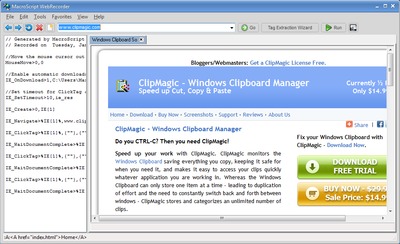
WebRecorder 3.0 – Faster, More Reliable, More Functions

Filed under: Automation, Web/Tech — Marcus Tettmar @ 11:04 pm

We have today released WebRecorder 3.0.

WebRecorder 3.0 - Faster more reliable internet macros

This is a major rewrite with a better recording engine capable of recording more tags and producing leaner, cleaner, code and a faster and more reliable runtime.

It also introduces a download manager so that file downloads can be recorded and scripted more easily without recourse to sending keystrokes to IE’s standard file download box.

We’ve improved the existing commands so that you can script more tags and use more attributes and added new functions for retrieving data, retrieving the screen position of elements and interfacing with the new native IE functions in Macro Scheduler 13.1.

Oh, and you no longer need to use the mouse to record clicks and form fills!

  • Cleaner, leaner, faster code.
  • More reliable method for waiting for documents to complete loading
  • Download manager for scripting file downloads
  • Better error trapping
  • Ability to set timeout for Clicks and Form Fills etc
  • Click and Form fill functions will wait until target tags exist (within timeout)
  • New functions for extracting data
  • New function to get X,Y screen position of elements
  • No need to use the mouse to identify recorded elements
  • New, improved UI look and feel
  • Runtime component integrates better with Macro Scheduler’s script controller (faster termination, less liable to hang ups when aborting scripts etc)
  • Interface easily with Macro Scheduler’s IEGetTags and IETagEvent function
  • New script function for waiting for text in the page before continuing
  • Functions to automatically set extracted tag buffer size and avoid buffer overruns

More information on WebRecorder here.  WebRecorder 3.0 scripts require Macro Scheduler 13.1 to run.

Enterprise customers with in-date maintenance can already download WebRecorder 3.0 from the registered download area.

Other customers can view upgrade options in their registered download account, or download a trial version here.

Trial Downloads | Registered Downloads | Upgrades

Macro Scheduler 13.1 Update

Filed under: Announcements — Marcus Tettmar @ 6:33 pm

Macro Scheduler maintenance release 13.1 is now available for download.

  • Added: IEGetTags function – get an array of tags from a given internet explorer document
  • Added: IETagEvent function – click/focus/set value of a given internet explorer document tag
  • Added: Ready for WebRecorder 3.0
  • Fixed: LibFunc not handling {“..”} parms correctly
  • Fixed: Very rare failures of CopyFile, MoveFile, DeleteFile, RenameFile
  • Fixed: msGetTextPos does not return anything if nothing found
  • Fixed: Timer being reset in OnEvent subroutines
  • Fixed: Label2Var unable to assign to existing variables
  • Fixed: Macro Properties/Standalone Editor not saving form position correctly

Registered Downloads/Upgrades | Evaluation Downloads | New License Sales

January 17, 2012

Vote for Your Favourite Macro Scheduler Story

Filed under: Announcements — Marcus Tettmar @ 10:29 am

Voting for our Kindle Fire contest is now open.

We’ve had a bunch of great entries. Some great uses of Macro Scheduler revealed such as automating game play, monitoring a global network of routers and DHCP servers, automating the production of medical reports at a Childrens’ Hospital, monitoring and reacting to stock movements, audio file retrieval, and all kinds of automated data entry.

Please check out the entries and vote for your favourite and share it with your friends. If you have entered yourself share it on your wall and ask your friends to vote.

Voting is open until 29th Feb and the winner will be announced first week of March.

January 12, 2012

January 6, 2012

Macro Scheduler 13.0.05 Update

Filed under: Announcements — Marcus Tettmar @ 11:25 am

Macro Scheduler maintenance release 13.0.05 is now available for download.

  • Added: CF_RESULT / CF_RESULT_CODE to DeleteFile, CopyFile, MoveFile, RenameFile
  • Added: Show Animations for DeleteFile, CopyFile, MoveFile, RenameFile by setting CF_ANIMATE=1
  • Fixed: Editor incorrectly saving size/height/position/font settings in MSched12 hive
  • Fixed: FindImagePos scanning entire screen even if WINDOW: specified
  • Fixed: DirectoryExists returning true for non-existant UNC paths
  • Fixed: _WRITE_LOG_FILE setting being ignored in OnEvent handler subroutines
  • Fixed: hot key incorrectly reporting script is in use for some macros
  • Fixed: Some help file fixes

Registered Downloads/Upgrades | Evaluation Downloads | New License Sales

January 3, 2012

Happy New Year!

Filed under: Announcements — Marcus Tettmar @ 12:30 pm

Today is the first working day of 2012 here in the UK. It should be a positive day but the weather is doing its best to put people in a bad mood, with torrential rain and gale force winds across the country disrupting commuters and generally causing havoc.

The office Christmas decs have been taken down and Gearhead has removed his santa hat.

But we’re looking up! And looking forward to the 15th year of Macro Scheduler. Isn’t that amazing? Still pushing the boundaries, and still boosting productivity throughout the world.

So Happy New Year to you all, and thanks for being there!

Don’t forget that our Kindle Fire competition is still open to entries. We’re accepting entries until 15th January when voting will commence. Just tell us how Macro Scheduler helps (or would help) you and you could win the fantastic Amazon Kindle Fire Android Tablet (or vouchers of equivalent value).

December 16, 2011

Christmas Promo Reminders

Filed under: Announcements — Marcus Tettmar @ 12:38 pm

Win a Kindle Fire (or $199 Amazon Vouchers)
Don’t forget about your chance to win an Amazon Kindle Fire running android, or vouchers of equivalent value. There are a few entries so far. There is still time to add yours. The closing date for submissions is 15th January when voting will commence. Enter here.

Get Macro Scheduler Lite Free with every Std, Pro or Enterprise Order
Until the end of December we’re giving away a copy of Macro Scheduler Lite with every new order of Macro Scheduler Std, Pro and Enterprise. Grab a copy for use at home, or for a friend or colleague. Offer ends 31st December.

Play Santa’s Gift Grab and Share Your Score
And finally, I hope you have been having fun with our little Christmas game. We certainly enjoyed making it. The highest score I’m aware of is 554 so far! Can you do better? Let us know how you did on our Facebook page.

December 15, 2011

Play Santa’s Gearhead Gift Grab Game!

Filed under: Announcements — Marcus Tettmar @ 4:29 pm

We made a fun little Christmas game for you all:

Help Santa get the presents down the chimney, but watch out for the snowmen and coal which freeze the chimney or set the presents on fire. Of course true to form Macro Scheduler saves you time, so in the game if you catch an MJT Gearhead you get extra time!

Click on the image above or here to play. Don’t forget to share your score!

Enjoy, and Happy Christmas!