Home of Macro Scheduler - Macro Tools and Automation Software
 Macro Scheduler - Automation Software
 "Advanced, Easy to Use, Windows Software Automation Tool"
Macro Scheduler Windows Automation Tool Works with Vista Buy Now
$58 - $1,325
Download
Free Trial

Macro Scheduler, a powerful automation tool for Windows.


Backed up by Free, Fast, Unparalleled Support

  • Comprehensive, Reliable Automation for any Software or Business Process.
  •  
  • Keyboard & Mouse Macro Recorder. Easily Create Scripts in Minutes.
  •  
  • Convert Macros to EXE files for distribution on other PCs. (Pro Version)
  •  
  • Unique Screen Image Recognition functions for automation of ANY process. Watch a demo.
  •  
  • Unique Screen Text Capture functions to retrieve/monitor screen text.
  •  
  • Flexible Scheduler & Unique AutoLogon* Technology for Unattended Operation.
  •  
  • Over 250 Powerful Built-in Script Commands, Loops, Conditionals etc, Plus Microsoft VBScript.
"Thank you! Thank you! Thank you! This has to be the best macro software since they invented "snuff". For you young folks, that is a tobacco that is chewed. I have used a lot of far more expensive macro programs and they just don't hold a candle ... Bottom line you have a sold customer for life." Tom Chambers

More Testimonials

Quick Buy:

Macro Scheduler is the computer automation tool that has been chosen by home users, small businesses, and Fortune 100 companies alike. Macro Scheduler's intuitive MacroScript language was designed specifically for automating Windows applications. By operating at the user level it is application-independent and allows automation of repetitive, time consuming tasks. Automate intricate software processes and save wasted time and money.

Download a Free Trial or get the latest version today from only $58, with our Risk-Free Guarantee.

Read Macro Scheduler's Résumé! View Success Stories and Usage Scenarios. Get Product Datasheet (PDF).

 What can Macro Scheduler do? TOP

The question should really be "What CAN'T it do?" for the possibilities are endless. Macro Scheduler is designed to automate ANY software process. Some examples of what people use this automation tool for include:

  • Eliminating Repetitive Data Entry
  • Automating Software Installations
  • Automating and Scheduling System & Network Tasks
  • Data Retrieval and Data Consolidation
  • Interfacing Multiple Incompatible Applications
  • Automating File Transfers and Internet Downloads
  • Screen Scraping - Screen Text Capture
  • Automating & Simpiflying ERP System Tasks
  • Automating Internet and Web Tasks (See WebRecorder)
  • Automatically Replying to Emails
  • Extracting Data & Generating Reports
  • Automated Software & Web Testing
  • Batching Multiple Tasks Together
  • Monitoring Applications
  • These are just a few things that Macro Scheduler can help with but with its comprehensive scripting language only your imagination is the limit. Using Macro Scheduler's WYSIWYG dialog designer some people have even written full-featured Windows Applications! Read success stories, usage scenarios and testimonials to see how computer automation with Macro Scheduler has helped existing customers.

    "Macro Scheduler is the best invention I've ever seen within my (15 year) IT career. Beside VMware ;-)."
    Robert Hohmann, Network Engineer / CCNA - More Testimonials
     Key Facts TOP

    • Macro Recorder. Simple Record and Playback mechanism
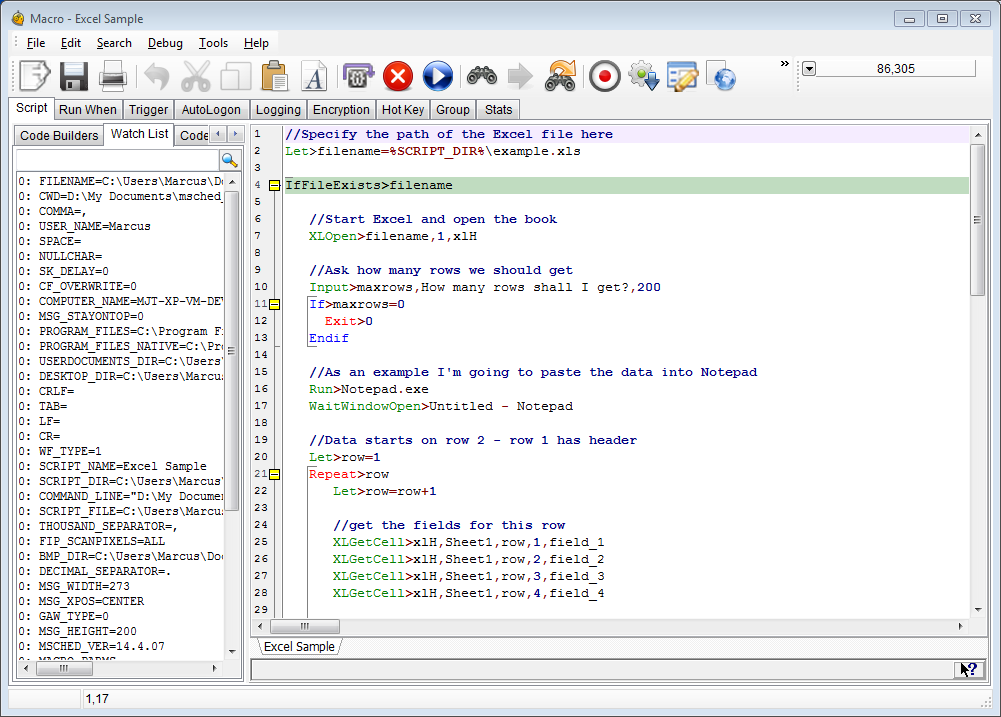
    • Human readable scripts
    • Native, built in code editor
    • Native, built in Debugger with full variable tracking and code stepping
    • Full featured built-in scheduler
    • Compile a script to an .EXE (executable program, give it to someone else to run who doesn't even have Macro Scheduler!) (Pro Version Only)
    • Custom Dialogs - Query any kind of data from the user.
      With WYSIWYG dialog builder.
    • AutoLogon Technology (Logs PC in if logged out/locked when script scheduled - NT,2K,XP Only)
    • Event triggers
    • Microsoft VBScript built in
    • Import 3rd party ActiveX/COM components, DLLs and access the Windows API
    • Support for Image Recognition and Automation of Graphical Objects & Non-Standard UIs
    • Powerful new Screen Text Capture commands to scrape text from any application. Try.
    • Read/modify data from text, CSV, Excel files; access ODBC/ADO SQL data sources etc
    • Context sensitive and fully documented command reference.
    • Beginners guide to help almost anyone get started
    • The ability to run macros remotely and on web servers (Enterprise Only - see: msNet)
    • A proven history from big business to home automation
    • Free, fast and responsive support
    • Demonstrable value for money
    "Microsoft came in and said there was no way to automate a particular problem. I downloaded Macro Scheduler and had a working fix in one day!" Ian Smith, UK

    More Testimonials


    Current Version: 10.1.02

    Macro Scheduler computer automation software.
     Macro Scheduler Case Studies TOP
     What's New in Version 10 TOP
    Macro Scheduler computer automation software.

    Macro Scheduler 10 introduces powerful screen text capturing functions which can retrieve almost all kinds of text from the screen and other windows. The image recognition functions have been optimised and FindImagePos has benefited from a 30-50 fold speed increase, making the time taken to find a bitmap on a 1600x1200 screen almost instantaneous.

    Image Recognition functions, built into Macro Scheduler since v9, have been made faster and more accurate. These functions make it possible to automate any application, graphically, regardless of the underlying user interface technology. Macros can automate the PC by "seeing" the screen - just like a real user does. Watch a demo of the Image Recognition functions now.

    We've also improved the debugger; added more script functions and improved existing ones; added support for more hot keys; a search bar and other UI enhancements to simplify use. Macro Scheduler 10 is now faster and more powerful, yet easier to use than any previous version.

    Of course, our computer automation tool still contains all the amazing functionality you have come to expect from previous versions such as the ability to compile macros to standalone .EXE files (Pro version), build full featured front ends for your macros with the WYSIWYG dialog designer, over 250 native script commands for complete Windows automation and user simulation, VBScript, complex expressions, standard program logic constructs, an intelligent macro recorder with window sensing technology and an integrated debugger to aid macro creation and problem resolution.


     What's in a Name? TOP

    Macro Scheduler does so much more than it's name suggests. Perhaps it's time for a new one? What's in a Name?


     Related Products TOP

     MacroScript Workflow Designer - "Live" Flowcharts that Run TOP

    Graphically depict business processes and workflows with flowcharts that run. Attach code to actions and decisions to create workflow diagrams that automate. Easily manage and organise scripts and code. Edit program flow with drag-and-drop. More Info.


     WebRecorder TOP

    Record Internet Macros and Web Automation Scripts. Quickly and easily create Macro Scheduler scripts to automate web applications and web sites by recording browser sessions with WebRecorder. Save days of coding! More Info.


     AppNavigator TOP

    Create powerful automation routines for your enterprise without writing a line of code. AppNavigator lets you create automation routines graphically with point and click. More Info.


     msNet - Macro Scheduler Remote Controller TOP

    Run scripts remotely across the network or internet with the msNet add in for Macro Scheduler Pro Enterprise. More Info.

    * AutoLogon has been tested successfully under default Windows XP, 2000 and 2003 installations. However, due to the huge number of possible security configurations, we are unable to guarantee successful operation of AutoLogon on your system.

    Buy Now | Download Now | Why Choose Macro Scheduler? | Customer Testimonials | Macro Scheduler Pro

    Sitemap | Privacy Policy | © MJT Net Ltd 1997-2008 All Rights Reserved.

    Windows Vista and the Windows logo are trademarks or registered trademarks of Microsoft Corporation in the United States and/or other countries.