January 15, 2009

Windows 7 Betta (sic)

Filed under: Windows 7 — Marcus Tettmar @ 4:20 pm

I’m no fish expert, so it meant nothing to me when I saw the pretty looking fish on the Windows 7 beta wallpaper.  Then I saw this CNET report.  Turns out it’s a Siamese fighting fish also known as a Betta fish, pronounced “beta”.  Presumably, therefore, it won’t be the default wallpaper in the final release?

Update: I hadn’t noticed – there are also 7 bubbles!

January 14, 2009

New Linux User Misses Macro Scheduler

Filed under: General — Marcus Tettmar @ 5:57 pm

A while back I got this comment in an email:

“I loved Macro Scheduler. Unfortunately, I’m now working exclusively on Mac and Linux boxes. I have kept a copy of Macro Scheduler, just in case I ever return to Windows, and have recommended it to many friends (2 of which have purchased copies).  After 2 years without Windows, I have to say that I don’t miss Windows, but I do miss Macro Scheduler.”

Despite the fact that we’ve lost a customer to Linux, I think that’s quite an endorsement. Linux has always catered to the sysadmin with its rich command line interface, and all Linux tools, utilities and system apps provide a command line processor. Linux also comes with a number of built-in scripting languages and an advanced scheduler called Cron. So Linux is made for being automated. Windows, on the other hand, was designed almost exclusively for human users and is purely graphical. Therefore, tools like Macro Scheduler are required to automate Windows applications. Nice to hear how important Macro Scheduler was to this sysadmin when he had to put up with Windows 🙂

January 12, 2009

Macro Scheduler 11.1 Update

Filed under: Announcements — Marcus Tettmar @ 12:25 pm

Macro Scheduler 11.1 Update is now available with the following fixes:

– Fixed: Text Capture functions (GetWindowTextEx, WaitScreenText, GetTextInRect, GetTextAtPoint) could
cause clipboard function to stop working in source application
– Fixed: Standalone Editor not prompting to save on exit after compile options changed and not saved
– Fixed: Inline Function selector not adding chevron to GetWindowList
– Fixed: Updating dialog in editor from popup menu could leave blank space at start of first line of dialog block
– Fixed: Find Next in Editor will now follow search direction as set in Find dialog
– Fixed: Tab characters causing text loss in watch list
– Change: Tray icon action changed to single click for Windows 7

Registered Downloads/Upgrades | Evaluation Downloads | New License Sales

January 11, 2009

January 9, 2009

Quick Tip: Automating Office 2007

Filed under: Uncategorized — Tags: — Marcus Tettmar @ 2:24 pm

Office 2007 does something weird to its window titles. What you see in the window title is not the real internal window title. It’s back to front. E.g. Excel says something like “filename.xls – Microsoft Excel” when in fact the correct title is “Microsoft Excel – filename.xls” just as it always has been. If you look at the task bar icon you’ll see it the right way around. That is what you need to use in your SetFocus/WaitWindowOpen commands etc.

Unicode – Does anyone read release notes?

Filed under: General — Tags: — Marcus Tettmar @ 2:19 pm

Probably the biggest change in Macro Scheduler 11, though not visual, was Unicode support. For Macro Scheduler to support Unicode in scripts it has to save the script files with Unicode encoding rather than ANSI encoding. And if you open a Unicode file up in an ANSI editor it’s going to look garbled. Since older versions of Macro Scheduler were ANSI only and didn’t know anything about Unicode, if you open a v11 script up in v10 (or earlier) that script is going to look wrong.

The v11 release notes have a big warning about this. Nothing is damaged permanently and it doesn’t have any effect on upgrading. It’s only an issue if you edit or create a script in v11 and then, for whatever reason, try to open it in an earlier version. So if, for example, you’re running v11 and you have another PC running v10 and you create a script on your PC and wish to open it on the PC running v10 it’s going to look messed up.

One solution of course is to upgrade that copy of v10 to v11.  But there is another solution. You can tell v11 to save the script with ANSI encoding. From the editor use File/Save As and then in the file type box select “ANSI Script Files”. Alternatively just open the script file up in Notepad and save it again, selecting ANSI in the Encoding box. This of course assumes that you don’t actually NEED Unicode. If you have Unicode characters in your script which you need to use, then clearly saving as ANSI will destroy them. In which case you do need to upgrade that v10 installation to v11.

Macro Scheduler Runs In Windows 7

Filed under: Announcements, General, Macro Recorder, Windows 7 — Tags: — Marcus Tettmar @ 2:05 pm

Whenever Microsoft release a new operating system I’m always a little anxious to make sure we test Macro Scheduler on it as soon as possible and find out what, if anything, needs to be changed. I’ve been following news about Windows 7 for a while now and, reading that it was built on the same core as Vista and Windows 2008, I fully expected Macro Scheduler to run fine on it. But there’s nothing like seeing it in the flesh to be absolutely sure. So when Windows 7 Beta was made available to MSDN subscribers yesterday I didn’t waste much time in downloading it.

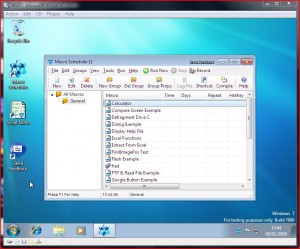
Installing Windows 7 into Virtual PC was nice and easy and I’m pleased to say my expectations were right – Macro Scheduler 11 runs absolutely fine.  Everything works as expected, including the macro recorder and even low level stuff like text capturing.  Here’s a screen shot of Macro Scheduler 11 running in my virtual Windows 7 environment:

Macro Scheduler in Windows 7

Macro Scheduler in Windows 7

January 6, 2009

New Year, New Site, New Look, New Logo, New Podcasts

Filed under: Announcements, General, Podcasts — Marcus Tettmar @ 4:29 pm

Happy New Year everyone!

And it’s not just a new year.  Everything else is new too.  Not content with a new release (Macro Scheduler V11) which we got out early in December we felt it was high time for a new look as well.  So along with a nifty new logo we have a new site design, as you will see if you are reading this on the web site.  If not, head on over to www.mjtnet.com and check it out.

There’s one very minor glitch noticeable only if you are using IE6, which is probably the worst web browser ever made.  Unfortunately, amazingly, according to our web server logs 35% of hits come from IE6.  If you are one of those using IE6 ditch it now!  Upgrade to IE7, or, better, try Firefox or Google Chrome if you have to.  Please.  Ok, we’re working on the IE6 issue.  Rant over.

If you spot any broken links, please let me know.

Also new is a series of Macro Scheduler user podcasts.  We thought it would be cool to interview some Macro Scheduler users, find out more about them and how they are benefiting from the software, what kinds of things they’re doing with it.  We figured rather than doing stuffy old case studies it would be more fun to be a bit more informal and create some podcasts.  You’ll find them over on the Customer Testimonial page.   So far there are six podcasts.  You can hear how Mitch Vincent uses Macro Scheduler for automated data input and software testing at K-Software.  Paul Griffin speaks about AppNavigator, how it is helping make mortgage approvals more efficient and how he became an MJT Net partner.  Antonius Momac also talks about software testing at Triple Point Technologies. Phil Lewis from Siemens tells us how Macro Scheduler helps him administer a large DNS network.  Bob Hansen talks about how he’s made a living automating his clients’ processes; and Keith Passaur of eDocFile talks about document imaging automation.

“I couldn’t work without Macro Scheduler. It is the glue that allows me to automate all the other office applications together.  I couldn’t support my customer’s without it.  I’m just so happy I found it when I did.”  Bob Hansen.

It’s great to hear how different people are using and benefiting from Macro Scheduler, and it’s really useful for other people working in similar areas.  Hopefully this will become a regular series.  If you would like to take part, drop me a line and we’ll set it up.  If you would like to get in touch with anyone featured in a podcast you’ll find links to their company websites on the podcast page, most of them hang out in the forums, or you can just drop me a line and I’ll put you in touch.

You can also subscribe to the podcasts at iTunes.  Here.  Enjoy.

All the very best for 2009 folks!