October 20, 2006

Get Back Vista Run Command!

Filed under: Vista — Marcus Tettmar @ 3:47 pm

The biggest annoyance for me with Vista is that, by default, the “Run..” option is no longer on the Start menu. If you’re like me it’s probably one of the most used items on your computer! Now, you can use the search box in Vista in the same kind of way. But there’s no drop down bringing up the last typed entries. Apparently, Microsoft removed the Run box from the Start menu because they seem to think most people won’t need it any longer. Hmph. I’m obviously not most people!

Luckily you can get good old “Run command” back by right clicking on the Start menu and selecting “Properties”, then “Start Menu”, then “Customize” and checking the “Run command” option.

But the simplest solution is one I missed completely! Just press the Windows key and R together. Win+R is the shortcut for the Run command. Simple!

Squidoo Lens

Filed under: General — Marcus Tettmar @ 11:39 am

Just for the heck of it I set up a Macro Scheduler Lens on Squidoo a while back. I didn’t expect much to come of it but recently I’ve noticed a small number of referrals from it, and its lens rank has jumped up to 4,538. Not bad considering it was as low as 20,000+.

Not really sure what I make of Squidoo. It’s a neat idea that might work well for people with no web presence wanting an easy way to create a page. But otherwise I’m not convinced.

The nice thing is that you can choose to donate any income the lens generates to charity. Great, but so far my lens has made only $0.42. So it’s not going to cure world poverty just yet!

October 19, 2006

Firefox2 or IE7?

Filed under: Web/Tech — Marcus Tettmar @ 5:33 pm

I see IE7 has been released. Haven’t installed it yet, but I do have an early beta version running on another PC and found that a bit clunky. I’m a Firefox fan though, so I’ve just downloaded and installed Firefox 2 RC3. I like it. The interface has been given a subtle update but it is also noticeably faster. I really like the built in spell check. I used to use the Google toolbar to spell check my posts, when I remembered – I invariably forgot! So having spell check built in is a great improvement. Now I just need to change the dictionary from US English to British English! 🙂

You can download Firefox 2 RC3 here.

October 11, 2006

“See” the Screen with Image Recognition

Filed under: General — Marcus Tettmar @ 2:52 pm

I love the Image Recognition functions in Macro Scheduler 9.0. They make it easy to automate anything. I made a quick and dirty demo showing how to use the Image Recognition functions in v9 to automate a remote Citrix session. You can watch the demo here.

Update: The video was produced way back in v9 before a number of improvements. With the current version it is no longer necessary to get the screen resolution and capture the screen as you can simply specify SCREEN in the haystack parameter of the FindImagePos command and it will automatically scan the screen. This cuts down the amount of coding while also improving performance. Since v12 it has also been possible to specify the number of pixels to match or whether to do an exhaustive search.

But imagine being able to build an automation script that will automate anything, regardless of the GUI technology or operating system – Web Sites, Java Applications, Desktop Applications, whatever – without writing a line of code. Just tell the computer what to click on by highlighting a screen object, what to do when it finds the object, what to do if it can’t be found, what objects to wait for etc. Wouldn’t that be cool? Well it’s not just a fantasy. We’re doing that right now and some customers are already using it. With this tool you just “teach” your computer what to do. Automation Scripts that took days, can now take minutes. I’m itching to show you, so watch out for a demo soon. If you can’t wait and if you think your company could benefit from something like that, give us a shout.

October 5, 2006

Macro Scheduler 9.0 Beta

Filed under: Announcements — Marcus Tettmar @ 9:09 am

Macro Scheduler 9.0 Beta has just been made available for testing to registered users. For details on how to download and for a list of new features check out the beta forum.

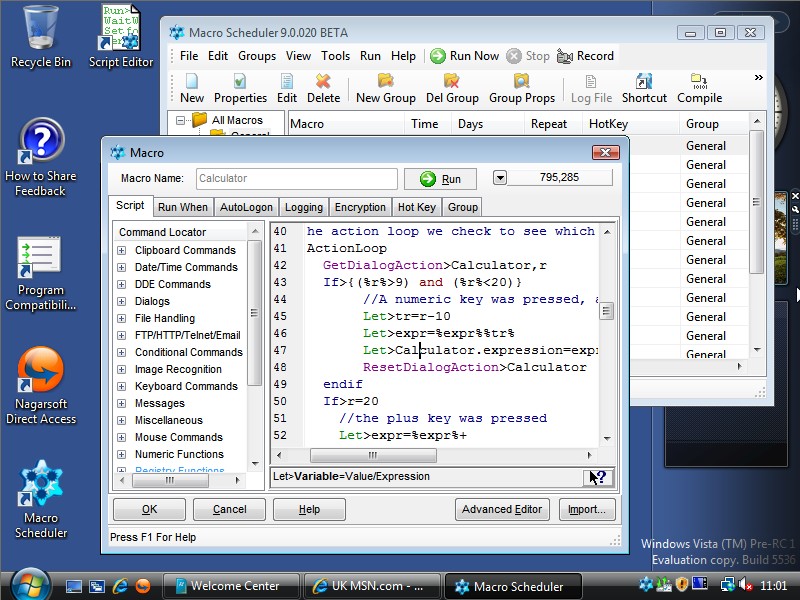
As you can see, Macro Scheduler now has a new icon. Yes, in a way, this is a sad day. The grey, trusty old cog wheel that has been with us for almost ten years has now made way for a new, bright young thing. Staying with the mechanised theme, Macro Scheduler now has a bright, vibrant sprocket with a higher colour depth and resolution for modern operating systems like Vista. So let us bid farewell to old cog and welcome in the new icon.

You’ll find a full list of what’s new in the forum, but the emphasis with this new version is on making the software easier to use and streamline the creation of scripts. We’ve updated and overhauled the macro builder on the Macro Properties dialog as well as the Script Editor to make script writing easier for novices as well as experts. A new Command Locator and Code Builder makes it easy to find the function you want and insert the code without having to remember the syntax or look it up in the help file. The Code Builder prompts you for the parameters and options that are needed. Syntax QuickHelp shows you the syntax as you edit, and the Inline Function Selector gives you a choice of functions/commands as you type. Code Snippets in the editor allows you to store often used pieces of code for quick insertion later.

In terms of the Scripting Engine we’ve added new commands, such as the Telnet scripting commands and improved the FTP commands to support multiple files. And expert coders will appreciate the IGNORESPACES directive. But my favourite improvement is the introduction of the Image Recognition functions, taken from the Image Recognition Library and now native to MacroScript and therefore easier to use. I don’t think I anticipated how useful the Image Recognition Library would be when it was released. For many people it has transformed the way they write automation scripts. Image Recognition allows the macro to “see” the screen and locate objects visibly – just like how a human uses the computer. This means any application can be automated, regardless of its underlying technology/interface. You can even automate remote applications running on non-Windows operating systems. So I think merging the Image Recognition Library into the language is an important step. And soon, hopefully, I might have some more news to share in regards to Image Recognition and automation script development …
September 29, 2006

September 28, 2006

September 26, 2006

We Love Ex-Users Too!

Filed under: General — Marcus Tettmar @ 3:24 pm

I think it says a lot when an ex-user still raves about our software. I saw this on a Technology Forum:

“I don’t know about free ones, but my favorite windows app ever was Macro Scheduler (I only say “was” because I am no longer a windows user). …. If you get the advanced version you can include vbscript in your macros. When I was programming VB I had macros that would generate data access code by connecting to a SQL database, querying metadata about a named table, and then spitting out appropriate SQL code and queries. It can run macros in response to keyboard shortcuts, timed events, or in response to the presence of a specified window.”

Nice to know that while some people might not miss Windows, they do miss Macro Scheduler 🙂

September 25, 2006

Macro’d Britney?

Filed under: General — Marcus Tettmar @ 4:44 pm

Every now and then when I’m checking out our web server logs I stumble across an unusual referrer. Today I was surprised to see a referral from a Britney Spears fansite. With a quick glance over my shoulder to make sure no one was looking I clicked the link and checked it out. I discovered a number of forum posts recommending the use of Macro Scheduler for automatically voting for Britney in various MTV music awards! Yes, fans have been creating macros to run for hours on end, submitting votes on the MTV website! I’m not quite sure what to make of it. Am I in some strange, small way, responsible for Britney’s success? In truth I would have thought that MTV would have some way of detecting automated voting, or would discard multiple votes in short succession from the same computer. But who knows? Is Macro Scheduler to thankblame for the state of Teen Pop today?

September 22, 2006

Wwwhy?

Filed under: General — Marcus Tettmar @ 6:55 pm

One of my pet peeves is when I hear newsreaders and TV presenters reading out website addresses and pronouncing the www prefix. Websites actually don’t need the www prefix these days. Reading out www is awkward, and wastes oxygen. Newsreaders don’t need to stumble and stammer over that cumbersome triplet of letters. E.g. if you want to tell people where to find Macro Scheduler just tell them macroscheduler.com. Easy to say and easy to remember.

So my second pet peeve is when I find a website that insists on the www prefix. Luckily they are rare. There’s really no reason why a website should insist on the www prefix at all. So if you own a website, make sure people can view your site without having to type in the www.

That’s all for now. Have a great weekend! 🙂