The Image Recognition Functions allow Macro Scheduler to "see" the screen.
Super Easy for Anyone to Automate Anything
Image Recognition removes all technical barriers from software automation. If you can see it on the screen you can automate it, and it's so easy anyone can do it.
Just as a human uses a computer by taking visual cues and interacting with visual components, so image recognition allows the computer to do the same thing.
Image Recognition allows ANY visual interface to be automated regardless of the underlying technology or target operating system. Given a capture of a screen element Macro Scheduler will find its position on the screen - or wait for it to appear - and return those coordinates so that it can be interacted with via mouse events.
And with the Image Recognition Wizard it is easy for anyone to automate anything, with no coding required.
Tolerant, Intelligent and Portable
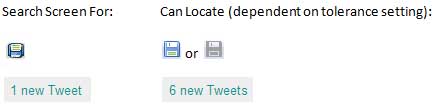
Using an intelligent pattern matching technology visual elements can be located on the screen even when their appearance differs slightly from the captured image. This means that, depending on the specified tolerances, Image Recognition can cope with differences in screen resolutions, font styles and Windows themes and can be made portable across different versions of Windows.
Precise Matching
Alternatively an exhaustive exact match search can be used where absolute precision is required and portability is not important.
Video Demo/Tutorial
Use Cases
The Image Recognition Functions for Macro Scheduler let you automate and test applications which do not expose standard windows objects or use non-standard technologies which prevent access to the GUI components. Use the Image Recognition Tools to automate Flash applets, Java applets, Remote Terminal Server, VNC or Citrix Sessions etc.
Tools such as Windows Terminal Server, VNC and Citrix serve up only an image of the remote workstation, passing screen refreshes and mouse/keyboard events back and forth. The actual properties of the windows and controls being displayed are unavailable to the client machine which only sees a graphical copy of the screen. Traditionally the only way to automate applications within a remote session was to have Macro Scheduler installed on the server. Now, with Image Recognition these types of applications can be automated by locating objects graphically and comparing changes to screens as they happen.
The Image Recognition Functions let your macros "see" the screen and make it easier to find and compare screen components, regardless of the technology used to display them.
Press Release: 1st August 2006
We first released a screen image recognition library for Macro Scheduler back in 2006! As far as we are aware we were the first to add such functionality to an automation tool, revolutionising what was capable. We have continued to adapt and improve the technology. This is our original press release:
For Immediate Release
Contact: Marcus Tettmar, +44 870 068 4523 / +1 360 519 5383
Macro Scheduler Image Recognition Library builds automation scripts that see the screen and are independent of GUI Technology.
MJT Net has released a free Image Recognition Library for Macro Scheduler, their popular Windows Automation Solution.
The Image Recognition Library allows Macro Scheduler to "see" the screen, and makes use of machine vision technology to automate processes by comparing and recognising actual images, instead of relying on X/Y coordinates or having to hook into the User Interface Layer.
The Image Recognition Library allows the user to automate and test applications and websites by using images instead of manipulating GUI controls and windows. It can also be used to automate and test applications which do not expose standard windows objects, or use non-standard technologies which prevent access to the GUI components. The Image Recognition Library may also be used to automate dynamic Web sites, Flash applets, Java applets, Remote Terminal Server, VNC or Citrix Sessions and more.
Tools such as Windows Terminal Server, VNC and Citrix serve up only an image of the remote workstation, passing screen refreshes and mouse/keyboard events back and forth. The actual properties of the windows and controls being displayed are unavailable to the client machine which only sees a graphical copy of the screen. Traditionally the only way to automate applications within a remote session was to have Macro Scheduler installed on the server. Now, with the Image Recognition Library, these types of applications may be automated by locating objects graphically and comparing changes to the screens as they happen. The Image Recognition Library can even automate non-Windows remote operating systems.
The Image Recognition Library is a free add-on to Macro Scheduler, a leading Windows Automation Solution.
Macro Scheduler has been chosen by home users, small businesses, and Fortune 100 companies alike. Its intuitive MacroScript language was designed specifically for automating Windows applications. By operating at the user level it is application-independent, allowing easy automation of repetitive, time consuming tasks and integration of disparate systems.
For more information on Macro Scheduler and the Image Recognition Library or for evaluation copies, please see: http://www.mjtnet.com/imagerecognition.htm
# # #
About MJT Net Ltd
Since 1997, MJT Net Ltd has been marketing automation utilities and productivity software for Windows users. With over a million companies and individuals utilizing Macro Scheduler technologies, MJT Net has become synonymous with software automation and SQA. Read more about MJT Net Ltd at http://www.mjtnet.com/
